
Consultation-firstTexas & U.S. remote
Custom business systems built around the way you work.
Automation Innovation Labs is a consultation-first automation and business systems firm. We replace scattered manual work and disconnected tools with clear, custom-built systems — then launch them properly, train your team, and keep improving them.
- Websites
- Portals
- Dashboards
- Automations
The problem
Where the work gets heavy.
We look for the repeated manual work, bottlenecks, missed follow-ups, and duplicate data entry that quietly eat the week.
Repeated manual work
The same information typed into three different tools, every single day.
Spreadsheet dependence
Duplicate data entry spread across spreadsheets, texts, forms, and portals.
Missed follow-ups
Handoffs stall and leads go quiet without anyone noticing in time.
No owner visibility
You can't see open work, blocked jobs, or what actually moved today.
Public front door → one work record
One work record.
Your website, lead intake, booking, and quote requests capture the work. Customers, jobs, files, notes, and next steps land in one private queue.
Team tasks · Customer updates · Owner view
Everyone sees what moved.
Your team's tasks, your customers' updates, and your own view of the business all run off that same record.
Map my workflowWhat we do
We build the system that helps your business run better.
We don't just make a business look better online. We build the digital infrastructure behind it — so leads, jobs, customers, staff, documents, payments, reports, and follow-ups move through a cleaner system.
Custom software for cleaner operations: internal dashboards, customer portals, field workflows, scheduling, approvals, reporting, and integrations between the tools you already use.
FIG. 02.1 — A workflow that runs itself
Polished, conversion-focused websites with service pages, local SEO structure, forms, booking flows, quote requests, and CRM handoff. The site becomes the first step in the workflow.
FIG. 02.2 — The front door, wired to the office
Private tools for owners, staff, customers, drivers, and technicians — role-based access, job tracking, files, status updates, audit trails, and operational reporting.
FIG. 02.3 — One portal, a view for every role
Before building, we study how the business works — from lead, job, or ticket through completion and follow-up — and turn bottlenecks, roles, and data into a system blueprint.
FIG. 02.4 — The blueprint, before a line of code
Technical SEO, page structure, schema markup, local search positioning, Google Business Profile support, and conversion copy — so the right customers find you and take action.
FIG. 02.5 — Found by the customers nearby
Not sure where you fit?
Start with an ops audit. We map the workflow first, then tell you what we'd build — and what we wouldn't.
Who we help
Built for businesses with real operational complexity.
AIL is a strong fit for companies with repeated manual work or service workflows that are outgrowing basic tools.
If you only need a simple public website, we can still help. But the flagship work is public presence plus private systems — the software layer that helps the company operate better.
- Trucking & logistics: Loads · BOLs · rate cons
- Field service businesses: Work orders · techs · parts
- Oilfield & energy: Field tickets · crews · JSAs
- Fuel & distribution: Deliveries · routes · tank levels
- Medical, dental & wellness: Intake · recalls · reminders
- Real estate & local services: Leads · showings · follow-ups
- Retail, food & appointment-based: Orders · bookings · no-shows
Running on too many spreadsheets, texts, forms, portals, or disconnected apps? That's exactly the mess we map.
How we work
Audit first. Build second.
We define the system before quoting the full production build — so what ships matches how the company actually runs.
- 01Step
Ops Audit
We document how work moves through the company, which tools you use, where time is being wasted, and where automation or better software creates real ROI.
- 02Step
System Blueprint
Workflows, roles, permissions, data structure, public and private pages, integrations, automations, launch risks, and recommended phases — defined before the full build is quoted.
- 03Step
Rapid Prototype
A fast working prototype with your real branding and realistic sample data. Something you can see, click, and react to before the full build is locked in.
- 04Step
Production Build
Durable architecture, clean user experience, mobile-aware interfaces, secure access, tested workflows, and production deployment.
- 05Step
Hardening & Launch
We verify the build, forms, notifications, mobile behavior, route protection, SEO basics, and core workflows. Ready for real users, not just a demo.
- 06Step
Training & Handoff
Access instructions, operator guidance, admin notes when needed, known limitations, and a support path — so your team can run the system confidently.
- 07Step
Ongoing System Care
Hosting, uptime checks, bug fixes, user changes, small improvements, report updates, automation ideas, and monthly workflow reviews.
Core offer ladder
Start with a diagnostic. Grow into a full operating system.
Four ways to engage AIL, sized to where the business is today.
Start here
01Rung 1Diagnostic / Blueprint
For businesses that need clarity before committing to a full build.
- Ops audit & workflow map
- System scope & automation plan
- Proposal with recommended phases
+ Public site & intake
02Rung 2Website + Intake System
For businesses that need a public site connected to real lead capture.
- Conversion-focused public site
- Booking, quotes & CRM routing
- Email / SMS notifications & simple reporting
+ Private system
03Rung 3Private Business System
For teams that need internal dashboards, portals, and records.
- Dashboards, portals & dispatch tools
- Documents, approvals & inventory
- Reporting & staff workflows
+ Everything connected
04FlagshipFull Operating System
Public website plus the private business system behind it.
- Public site + private system
- Automations, integrations & dashboards
- Training & ongoing support
Flagship client
A patient-ready website out front. Tempo and the staff apps behind it.
The Dental Studio of Midland is a general, cosmetic and implant practice in Midland, Texas. We rebuilt its public website to bring in new patients, then built the private systems the team runs on every day: Tempo for time and payroll, a staff portal, and inventory. Everyone signs in as themselves and sees only what their role allows.



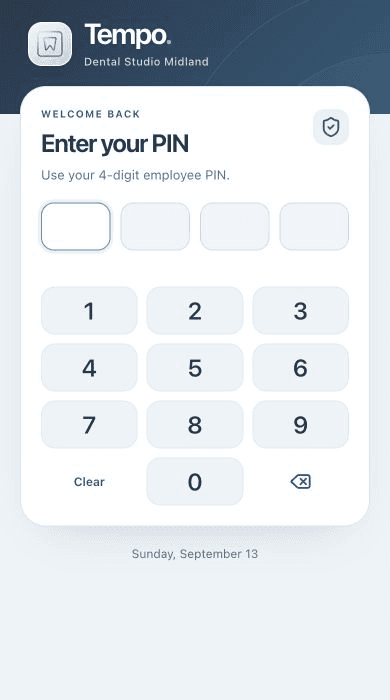
Live website capture · real Tempo sign-in · dashboards shown with sample data
- 01
New patients request visits online
Eight treatment pages, appointment requests and a call-tracked contact form, in English and Spanish.
- 02
Staff clock in with their own PIN
Tempo runs on a kiosk, tablet or phone. Admin, manager and employee roles decide what each person can see and change.
- 03
Pay periods close cleanly
Timesheets with a change history, time-off and correction approvals, overtime flags, and locked periods.
- 04
Supplies tracked by scan
Barcode checkout, low-stock and expiry alerts, purchase orders and procedure-kit readiness.
What patients, staff and owners get
24/7
Appointment requests
New patients can ask for a visit any time, even after the office closes.
1
Tap to clock in
Staff start their shift from a phone, tablet or the front-desk kiosk.
0
Timesheets added up by hand
Hours, overtime and time off add themselves up, ready for payroll.
Live
Who's on the clock
The owner sees who's working right now, from any phone or computer.
Same playbook, every industry
One playbook. Tuned to every trade.
A public front door that captures the work, and a private system that runs it. Every build starts from that blueprint, then gets tuned to the trade.
The Dental Studio of Midland
A patient website that brings in new visits, with the apps the team runs on every day behind it.
PublicPatient websitePrivate- Tempo
- Staff portal
- Inventory
Personal sign-ins, and each role sees only its part
Global 3Xpress
A freight website that captures requests, connected to a private TMS for dispatch, drivers and owners.
PublicFreight websitePrivate- TMS
- Dispatch
- Driver docs
Freight requests land straight in dispatch
Ready for your trade
What comes in → what it runs
- 01Oil & gasJob requests to Field tickets
- 02Fuel distributionOrders to Delivery routes
- 03Real estateInquiries to Showings
- 04Service businessesBookings to Work orders
- 05BakeryPre-orders to Pickups
- 06CosmeticsOnline orders to Inventory
- 07Event centersTour requests to Bookings
- Don’t see your trade?Start with an ops audit
Lab product
AILEngine turns brand context into marketing work.
Our internal marketing engine scans the business first, then generates campaign sets — captions, emails, ad copy, calendars — with the brand context still attached. It's the same pattern we build into client systems: context in one place, output connected to it.
Brand context
Sweet Crumb Bakery
Example brand
- Offers
- Kolaches · custom cakes · weekend boxes
- Audience
- Commuters · families · event planners
- Channels
- Instagram · email · local ads
Social post
Kolaches, cinnamon rolls, and one surprise…
Ad
Calendar
M
T
W
T
F
S
S
Why AIL
We focus on the way the business actually works.
AIL does not treat every client like a template job. Our advantage is owning the whole path — from diagnosis to ongoing improvement.
Fast AI builders and no-code tools are useful for prototypes, but serious business systems need judgment, structure, deployment discipline, and support. We use modern AI-assisted development to move quickly — the output is still owned, structured, and built around your operations.
- 01Ops Audit
- 02System Blueprint
- 03Rapid Prototype
- 04Production Build
- 05Hardening & Launch
- 06Training & Handoff
- 07Ongoing System Care
Production-grade by default, on the same modern foundations leading product teams ship on.
- Types
- Type-safe end to endOne set of rules from the database to the screen.
- Delivery
- Edge-deployedPages load fast wherever your customers are.
- Access
- Role-basedOwners, staff and customers each see only their part.
- Data
- Real-timeChanges show up without anyone refreshing.
- Method
- AI-assisted, human-reviewedWe move fast without shipping guesswork.
- Add-ons
- Payments, texting & schedulingWired in when the project calls for them.
Book an ops audit
Tell us how the work runs today.
Bring us the messy workflow. We map it, build it, launch it, and improve it.
- Call or text
- (432) 559-8970
- Service area
- Texas and U.S. remote
- First step
- An ops audit of how the work runs today
Ops audit request
A few details and we'll schedule the audit.